


How to Integrate AI Features Into Your Existing Mobile App
AI integration in mobile apps helps businesses enhance existing applications with smarter features, such as AI chatbots, personalized recommendations, and automated workflows, without rebuilding the entire app.
Businesses can explore our AI app development services to identify the right AI features for their existing applications.
in mobile apps enables businesses to introduce features such as AI chatbots, personalized recommendations, and automated workflows without rebuilding the entire application. With the right AI features and technology, you can improve user experience, streamline operations, and deliver more value to your customers.
What Is AI Integration in Mobile Apps?
AI integration means adding artificial intelligence capabilities to an existing mobile application so it can perform tasks such as understanding natural language, recognizing images, analyzing information, or generating personalized recommendations.
For example, an e-commerce app might already allow customers to browse products and place orders. By integrating AI, the same app could recommend products based on customer preferences or answer questions through an intelligent chatbot.
Similarly, a fitness application could provide personalized workout suggestions, while a business application could summarize documents or automate repetitive administrative tasks.
These capabilities can be introduced through AI APIs, machine learning models, cloud-based services, or compatible on-device AI technologies.
The goal is not simply to add AI to your app. It is to solve a genuine user problem and make the existing application more valuable.
Why Should You Add AI Features to Your Existing Mobile App?
AI can help businesses improve their applications while building on the technology and functionality they already have.
1. Improve the User Experience
AI can help users find information faster, receive more relevant recommendations, and complete tasks with fewer steps.
For example, an online shopping application could suggest products based on a customer’s interests instead of requiring them to browse hundreds of items manually.
2. Automate Repetitive Tasks
Many applications involve repetitive activities such as answering common questions, categorizing requests, extracting document information, or preparing summaries.
AI can automate parts of these workflows, reducing manual effort and helping employees focus on more complex tasks.
3. Provide Faster Customer Support
An AI-powered chatbot can answer common questions, explain product features, and guide users through application workflows.
When connected to an approved knowledge base, it can provide relevant information around the clock and transfer complex requests to human support when necessary.
4. Make Better Use of Data
Existing applications often collect useful information about user interactions, purchases, searches, and preferences.
With appropriate permissions and privacy safeguards, AI can help identify patterns in this data and support more informed business decisions.
5. Extend Your Existing App
You do not always need to build a new application to introduce intelligent functionality. Depending on your current architecture, developers can integrate AI through existing APIs, backend services, or on-device models.
This allows businesses to introduce new capabilities while preserving much of their existing application.
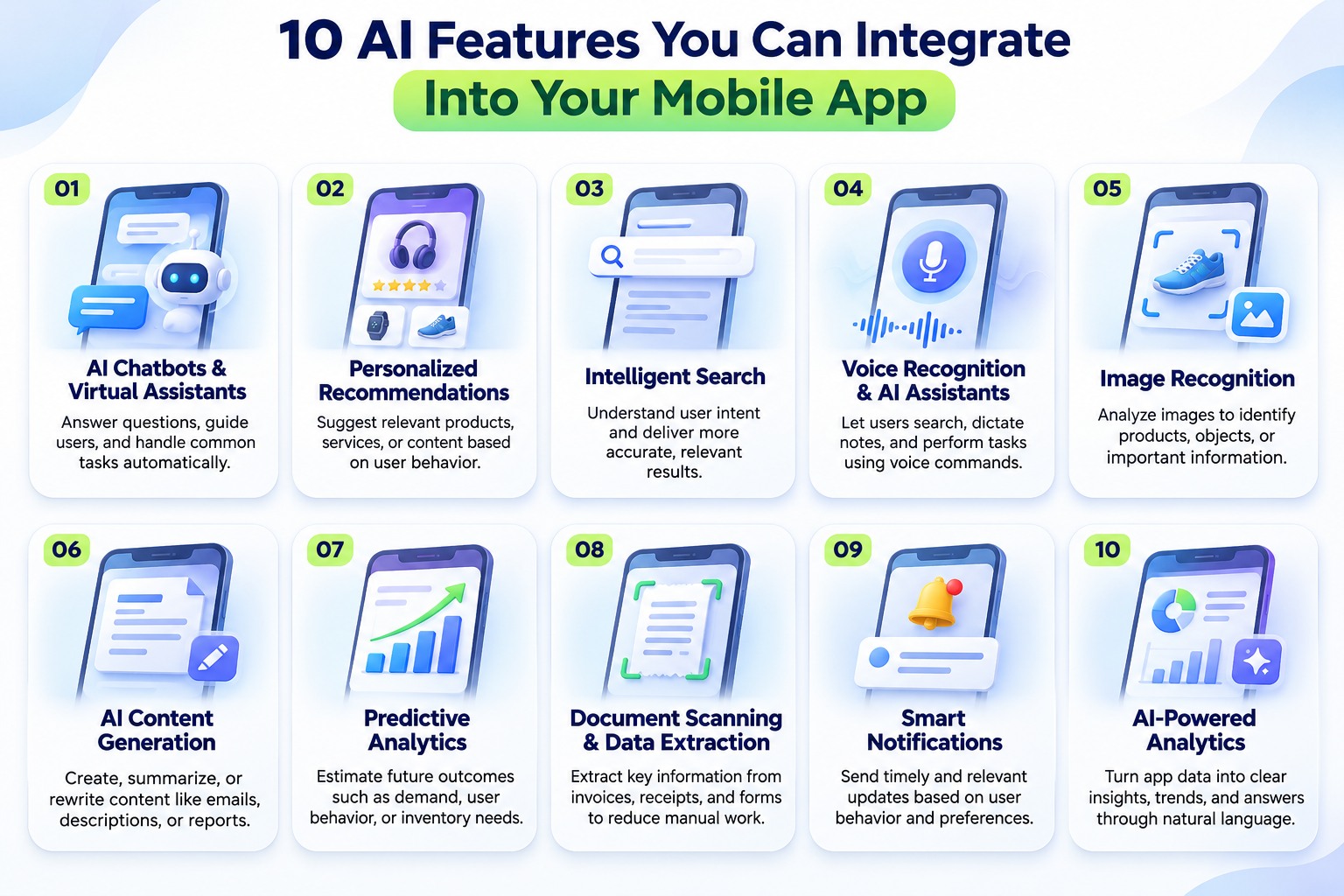
10 AI Features You Can Integrate Into Your Mobile App
The best features depend on your business goals, target audience, and available data. Here are ten practical options to consider.
1. AI Chatbots and Virtual Assistants
AI chatbots allow users to ask questions in natural language instead of searching through multiple screens or help pages.
An e-commerce application could use a chatbot to answer questions about products, shipping, and returns. A travel application could help users discover destinations or understand booking options.
More advanced assistants can retrieve information from company documents or interact with authorized business systems.
2. Personalized Recommendations
Recommendation systems analyze relevant preferences and behavior to suggest products, services, or content.
For example, a streaming app could recommend movies based on viewing preferences, while an online store could suggest products related to previous purchases.
3. Intelligent Search
Traditional search often relies on matching exact words. AI-powered semantic search can understand the meaning behind a query and return relevant results even when the wording differs.
This is particularly useful for shopping apps, educational platforms, document libraries, and content-heavy applications.
4. Voice Recognition and AI Assistants
Voice features allow users to search, dictate notes, or interact with selected application functions using spoken commands.
A field service application, for instance, could let technicians dictate maintenance notes instead of typing them manually.
5. Image Recognition
Computer vision enables applications to analyze images and identify relevant information.
Retail applications can use visual search to help customers find similar products, while document management applications can extract information from scanned documents.
6. AI Content Generation
Generative AI can help users create, summarize, or rewrite content directly within an application.
Possible features include generating email drafts, writing product descriptions, summarizing documents, and creating marketing content.
Users should be able to review and edit generated content before using it.
7. Predictive Analytics
Predictive models analyze historical and current data to estimate possible future outcomes.
Businesses can use this capability for demand forecasting, customer behavior analysis, inventory planning, and other suitable applications.
Predictions should be evaluated carefully and treated as estimates rather than guaranteed results.
8. Document Scanning and Data Extraction
AI can extract relevant information from invoices, receipts, forms, and other documents.
An expense management app could identify the merchant, date, and total amount from a receipt, reducing manual data entry.
9. Smart Notifications
AI can help identify which notifications are likely to be relevant to a user and when they may be useful.
For example, a learning app could remind a user about an unfinished lesson, while a shopping app could send relevant updates about an order.
Notifications should respect user preferences and avoid becoming intrusive.
10. AI-Powered Analytics
AI can summarize data, identify patterns, and help users explore information through natural-language questions.
For example, an authorized business user could ask which products experienced the highest sales growth during a particular period.
Access permissions must remain in place so that users only receive information they are authorized to view.
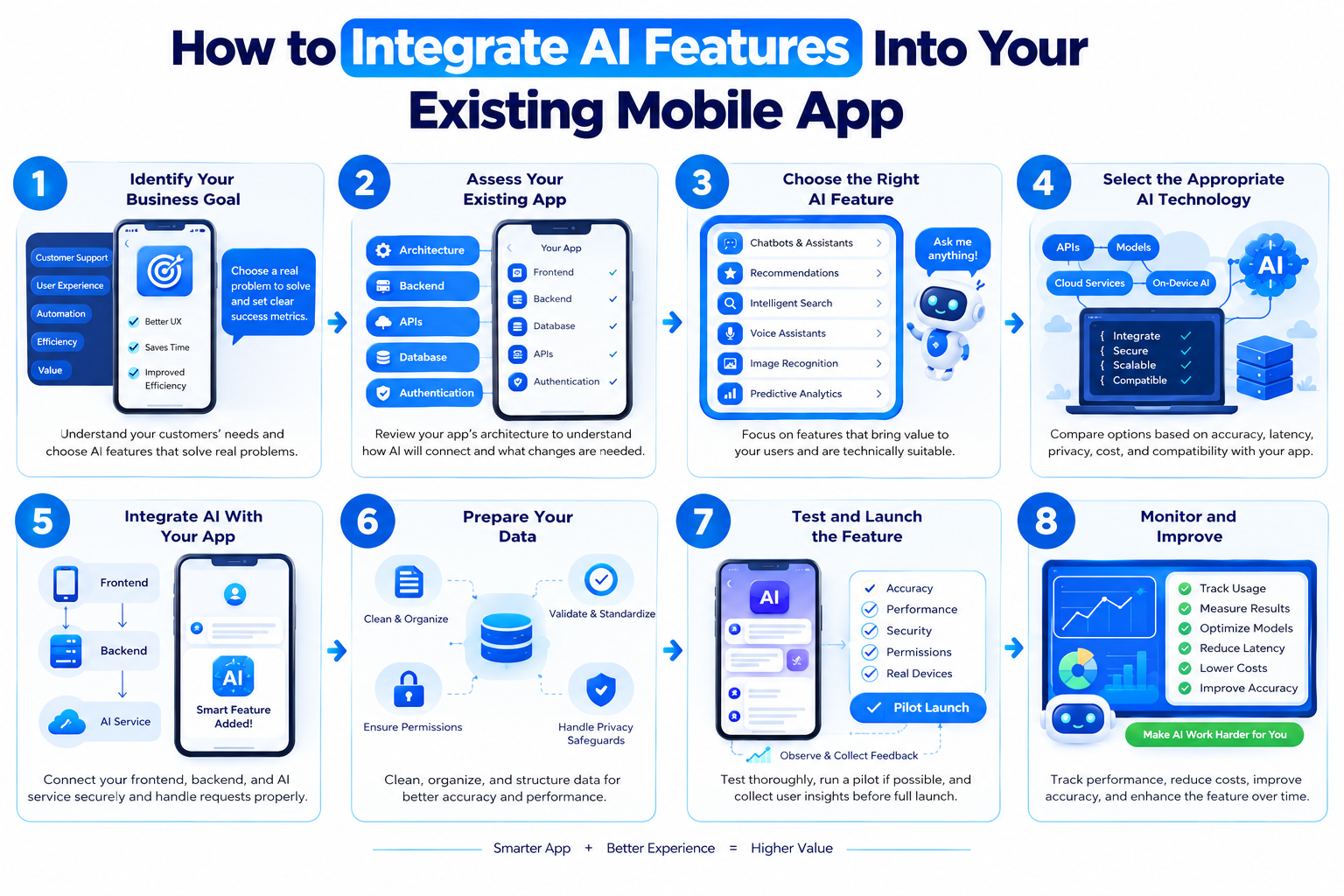
How to Integrate AI Into Your Existing Mobile App: 8 Steps
Adding AI becomes easier when you follow a clear implementation process. Instead of changing everything at once, start with one useful feature and expand as you learn what works.
Step 1: Identify Your Business Goal
Start by deciding what you want AI to improve.
Do customers struggle to find information? Does your support team answer the same questions repeatedly? Are users spending too much time completing manual tasks?
Your answers will help determine which AI feature makes the most sense.
For example, if users frequently ask about product availability, an AI assistant connected to approved product information may be useful.
Define measurable success criteria before development begins. These could include faster task completion, fewer repetitive support requests, or improved search engagement.
Step 2: Evaluate Your Existing Application
Review your mobile app’s frontend, backend, APIs, database, and authentication system.
Your development team should determine how the proposed AI feature will communicate with existing services and what changes may be necessary.
For example, a recommendation engine may require access to relevant product information and appropriately collected interaction data.
A chatbot may need a secure way to retrieve information from your existing help center or business systems.
This assessment helps identify technical limitations before development begins.
Step 3: Choose the Right AI Feature
Prioritize features based on business value, implementation effort, data availability, and risk.
A simple chatbot may be a practical first project for a business with many repetitive customer questions. An application with a large product catalog may benefit more from intelligent search.
Avoid adding multiple AI features before validating the first one.
A focused implementation makes it easier to evaluate results, control costs, and identify areas for improvement.
Step 4: Select the Appropriate AI Technology
Different features require different technologies.
- AI APIs: Useful for integrating existing AI capabilities without building a model from scratch.
- Large language models (LLMs): Suitable for conversational assistants, summarization, and text generation.
- Retrieval-augmented generation (RAG): Helps language models use relevant information retrieved from approved documents or knowledge sources.
- Custom machine learning models: Useful for specialized prediction, classification, and recommendation tasks.
- On-device AI: Suitable for selected use cases that benefit from local processing or offline functionality.
Compare accuracy, latency, privacy, operating costs, and platform compatibility before making a decision.
Step 5: Connect AI to Your Existing App
In many applications, the mobile frontend sends a request to the backend, which communicates with the selected AI service.
This architecture helps developers manage authentication, permissions, business logic, request validation, and usage monitoring.
For example, when a user asks a question in an AI chatbot, the app can send the request to your backend. The backend retrieves relevant information, calls the AI service, validates the response, and returns the result to the user.
Private AI API credentials should generally remain on the server rather than being embedded in the mobile application.
Step 6: Prepare Your Data
AI features often depend on relevant and reliable information.
Depending on the use case, you may need to clean existing records, standardize formats, remove duplicates, or organize documents into a searchable knowledge base.
For a customer support chatbot, this might involve preparing approved help articles, product documentation, and company policies.
For a recommendation engine, it could involve organizing product details and relevant user interactions.
Always establish appropriate permissions, data-retention rules, and privacy safeguards before processing personal or confidential information.
Step 7: Test and Launch the Feature
Test the AI feature using realistic user scenarios before making it widely available.
Check response quality, application performance, error handling, access permissions, and behavior when the AI service is unavailable.
For generative AI, evaluate incorrect responses, unsupported claims, and attempts to access unauthorized information.
Where practical, release the feature to a limited group of users first. Collect feedback and compare the results with your original goals before expanding availability.
Step 8: Monitor and Improve
After launch, monitor usage, response quality, latency, errors, user feedback, and operating costs.
You may need to optimize prompts, improve the knowledge base, reduce unnecessary requests, or adjust the model.
Regular evaluation helps ensure the feature remains useful as your application and user requirements evolve.
What Technologies Can You Use for AI Mobile App Integration?
The best technology stack depends on your existing application and the AI capability you want to introduce.
| Technology area | Examples | Purpose |
| Mobile development | Flutter, React Native, Swift, Kotlin | Build and maintain the mobile interface |
| Backend development | Python, Node.js, Java, .NET | Manage business logic and AI requests |
| AI services | OpenAI API and other AI providers | Add language and generative AI capabilities |
| Machine learning | PyTorch, TensorFlow, scikit-learn | Develop or run suitable machine learning models |
| Data storage | PostgreSQL, MongoDB | Store application information |
| Cloud infrastructure | AWS, Microsoft Azure, Google Cloud | Host and scale application services |
For example, an existing Flutter application could communicate with a Python or Node.js backend that connects to an AI model provider.
You do not need to replace your current technology stack just because you want to introduce AI. The goal is to choose technologies that integrate reliably with your existing application.
How Much Does It Cost to Integrate AI Into an Existing Mobile App?
The cost depends on the feature’s complexity, the current application architecture, data requirements, security needs, and expected usage.
A basic API-based feature may require less development effort than a custom AI system involving document retrieval, specialized models, or multiple enterprise integrations.
The main cost factors include:
- Development effort: Mobile development, backend integration, and testing.
- AI usage: API requests, tokens, model usage, and computational resources.
- Data preparation: Cleaning, organizing, and validating information.
- Infrastructure: Hosting, databases, monitoring, and scaling.
- Security: Access controls, privacy reviews, and security testing.
- Maintenance: Ongoing monitoring, updates, and optimization.
Before estimating your budget, define the feature, expected user volume, data requirements, and performance expectations.
Starting with a small proof of concept can help you validate feasibility and estimate ongoing costs before investing in a larger implementation.
Common Challenges and How to Overcome Them
Data Privacy and Security
AI features may process personal information or confidential business data.
Minimize the information sent to AI services, enforce appropriate access controls, encrypt data in transit, and review provider data-handling practices.
Inaccurate AI Responses
Generative AI can produce incorrect or unsupported information.
Use suitable evaluation, approved knowledge sources, validation rules, and human review for sensitive decisions.
High Operating Costs
Uncontrolled usage and unnecessarily large requests can increase expenses.
Monitor usage, apply appropriate limits, optimize prompts, and select cost-effective models that meet your quality requirements.
Slow Application Performance
Cloud-based AI requests may introduce delays.
Optimize request sizes, handle lengthy tasks asynchronously, and consider on-device processing for suitable features.
Compatibility With Legacy Systems
Older applications may require backend changes or additional APIs.
Introduce changes incrementally and modernize only the components needed for the new functionality wherever practical.
Best Practices for Successful AI Integration
To get the most value from your investment, follow these recommendations:
- Start with a clearly defined business problem.
- Prioritize one high-value AI feature.
- Assess your existing architecture before development.
- Keep private API credentials on the server.
- Use authorized and appropriately prepared data.
- Test accuracy, performance, and security.
- Monitor operating costs and user adoption.
- Provide fallback options when AI services fail.
- Keep users informed about AI limitations.
- Review and improve the feature after launch.
These practices help make AI integration more reliable and easier to maintain.
When Should You Hire an AI App Development Company?
Integrating AI can require expertise in mobile development, backend engineering, data processing, model selection, and application security.
An experienced development partner can help you assess your existing application, identify practical AI opportunities, select appropriate technologies, and plan a secure implementation.
Consider professional support if you want to add AI chatbots, intelligent search, personalized recommendations, or generative AI capabilities but do not have the necessary in-house expertise.
When evaluating a development partner, look for relevant technical experience, a clear implementation roadmap, realistic cost estimates, and a plan for post-launch support.
At Flutter Agency, you can explore AI app development services to understand how intelligent capabilities could fit into your existing product and business requirements.
Frequently Asked Questions
Can I integrate AI into my existing mobile app?
Yes. Many applications can add AI through APIs, backend services, or on-device models. The implementation depends on your existing architecture and the feature you want to introduce.
Do I need to rebuild my app to add AI?
No. A complete rebuild is often unnecessary. Some applications may need backend upgrades, additional APIs, or improvements to their data architecture.
Which AI features are best for mobile apps?
Chatbots, intelligent search, personalized recommendations, voice assistants, document processing, and predictive analytics are common options. Choose features according to your users’ needs and business objectives.
How long does AI integration take?
The timeline depends on feature complexity, data readiness, infrastructure, and testing requirements. A simple API-based feature may take less effort than a custom AI system with multiple integrations.
Is AI integration expensive?
Costs vary according to development effort, model usage, infrastructure, data preparation, and maintenance. Starting with one focused feature can help control the initial investment.
Can AI features work offline?
Some AI features can run offline using compatible on-device models. Others depend on cloud services, so offline support depends on the selected technology and device capabilities.
Can I add AI to a Flutter application?
Yes. Flutter applications can integrate AI through backend services, APIs, and compatible on-device machine learning solutions. The best approach depends on the required functionality and target platforms.
Conclusion
Integrating AI into your existing mobile app can help you deliver more personalized experiences, automate repetitive tasks, improve search, and introduce useful capabilities without necessarily replacing your current application.
The best approach is to start with a real business problem, evaluate your existing technology, choose the right AI solution, and test the feature carefully before scaling it.
With thoughtful planning and ongoing optimization, AI can become a practical extension of your existing product rather than an unnecessary layer of complexity.
Explore our guide to the 10 Best AI App Development Companies to compare providers and understand their AI development capabilities.
Ready to enhance your mobile app with AI? Contact Flutter Agency to discuss your requirements and explore an AI integration approach tailored to your product and business goals.





Read and share new topics about all things Tech.
Fill out the form below and we will be in touch soon!
"*" indicates required fields