


Healthcare App Development in 2027: Cost, Features & HIPAA Compliance Guide
Healthcare app development means building a mobile or web app that handles health data safely. In 2027 that means four jobs: pick one clinical problem, map HIPAA and FDA rules, design for every patient, and budget for upkeep.
This guide is for founders, clinic owners and product leads planning a patient, provider or admin app. You will get cost ranges by app type, a HIPAA decision guide, a feature list and a 7-step build plan.
Flutter Agency is the Flutter team of BOSC Tech Labs, with offices in Burbank, California and Gandhinagar, India. Our health work includes UME, a HIPAA-compliant medication identification app.
You can see how we built it in our UME medication app case study.
Key takeaways:
- Cost depends on patient data, integrations and user roles far more than on screen count.
- HIPAA applies when the app handles health data for a provider, a health plan or one of their vendors.
- Most mobile leaks come from notification previews, logs, analytics SDKs and screenshots, not hackers.
- HHS-fuOne Flutter codebase can serve the patient app, the provider app and the web portal.nded providers with 15+ staff must meet WCAG 2.1 AA in their apps by May 11, 2027.nded providers with 15+ staff must meet WCAG 2.1 AA in their apps by May 11, 2027.
What Is a Healthcare App?
A healthcare app is any mobile or web app that collects, shows or sends health information for patients, clinicians or administrators. That includes booking, records, messaging, monitoring and billing tools.
Who builds healthcare apps
Four groups invest in healthcare app development today, and each starts from a different problem:
- Hospitals and clinics: patient portals, booking apps and staff tools that cut phone calls and paperwork.
- Digital health startups: focused products, such as therapy, chronic care or medication apps.
- Health plans: member apps for benefits, claims and care programs.
- Pharma and medtech companies: companion apps for drugs and connected devices.
Wellness apps vs medical apps
A wellness app tracks steps, sleep or diet for the user. A medical app supports diagnosis, treatment or care decisions, so it faces stricter rules.
For example, a sleep diary sold in the App Store is a wellness app. The same diary, prescribed by a clinic and shared with the care team, becomes part of medical care.
Decide which side you are on before you plan features. That one choice decides most of the compliance work in medical app development.
Types of Healthcare Apps You Can Build
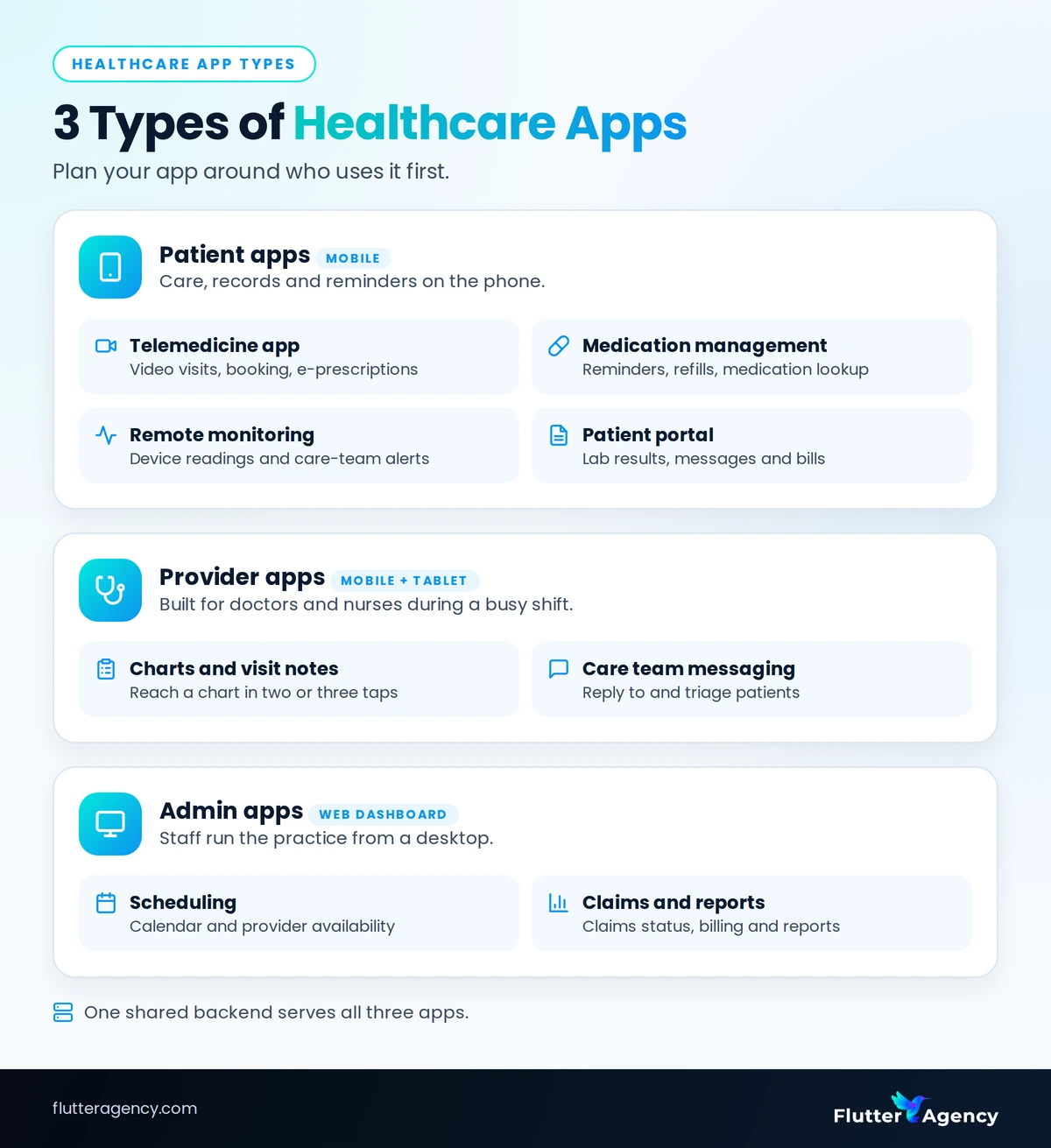
Healthcare apps are easiest to plan by their main user: patients, providers or administrators. Most products start with one user group and add the others once the first workflow works.
Patient apps
- Telemedicine app: video and chat visits, with booking and e-prescriptions.
- Medication management app: reminders, refill alerts and medication lookup for patients and caregivers.
- Remote monitoring app: collects readings from home devices and alerts the care team.
- Patient portal: lab results, secure messages and bills in one place, which cuts calls to the front desk.
Provider and admin apps
- Provider app: charts, tasks and visit notes for doctors and nurses, built for speed during a shift.
- Practice admin dashboard: scheduling, claims status and reports for clinic staff.
Web or mobile?
Patient apps usually live on phones, while staff tools are used on desktops. That is why healthcare web app development often pairs with the phone app: staff work on a web dashboard, patients use mobile, and both share one backend.
A common mistake is planning all six types at once. Pick the one that solves your most expensive problem first; that keeps the first phase of healthcare app development small enough to finish and test.
Does a Healthcare App Need to Be HIPAA Compliant?
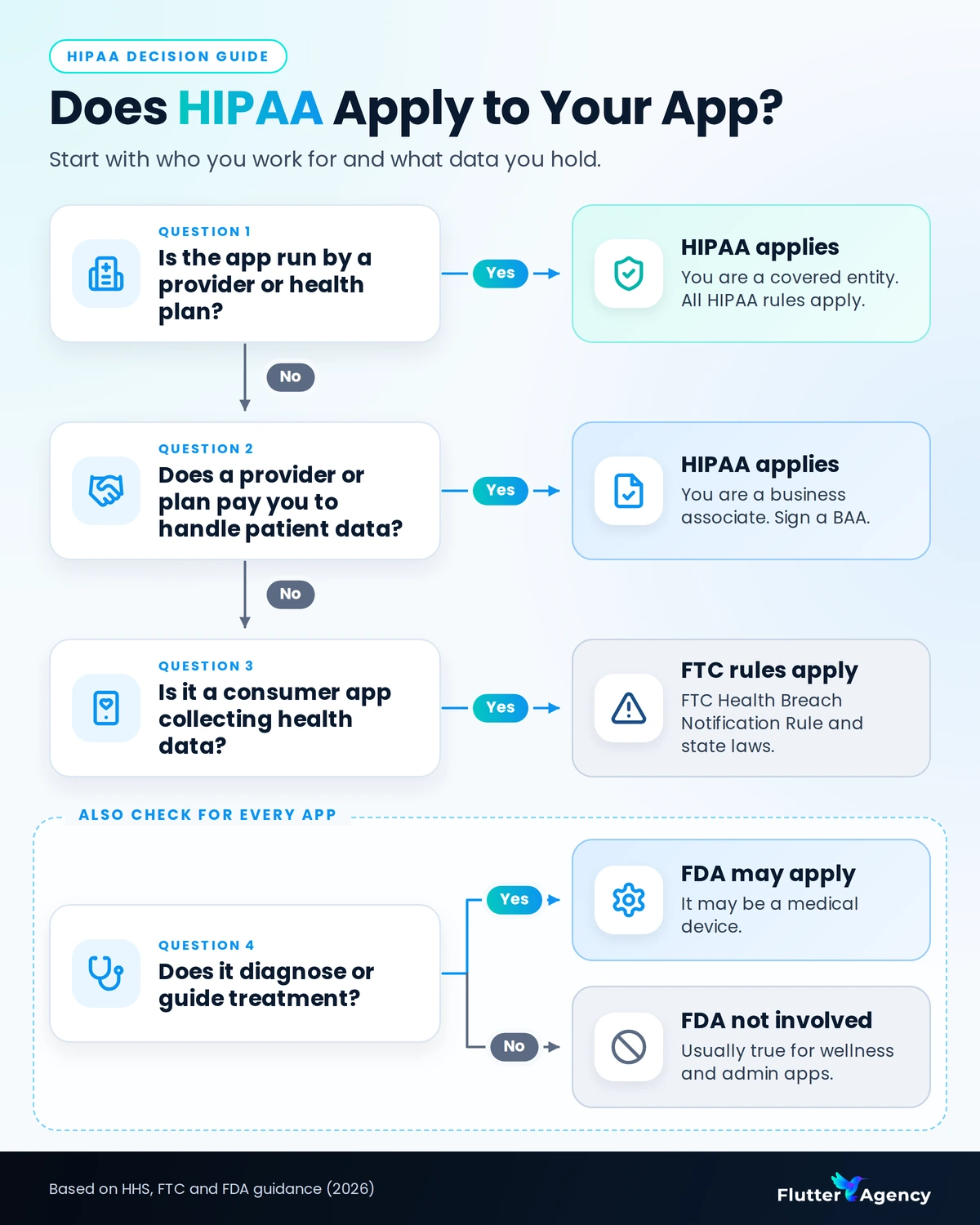
Yes, if the app creates, receives, stores or sends protected health information (PHI) for a provider, a health plan or one of their vendors. A direct-to-consumer wellness app usually falls under the FTC Health Breach Notification Rule instead.
PHI means health details linked to a person, such as a diagnosis, a lab result or a prescription tied to a name. In 2025, 710 large health data breaches were reported to HHS, about two a day, exposing data on at least 61.5 million people (HIPAA Journal).
When HIPAA applies
HHS gives app developers a simple test: you are likely a business associate if a provider or health plan hires you, or pays for the app, and directs you to handle PHI (HHS guidance). Here is how it plays out:
- A clinic’s own patient app that shows lab results: HIPAA applies, because the clinic is a covered entity.
- An app a hospital pays you to run with its patient data: HIPAA applies, because you are a business associate.
- A step or sleep tracker sold directly to consumers: HIPAA usually does not apply, but the FTC rule and state laws do.
- An app that suggests a diagnosis or a dose: HIPAA may apply, and FDA device rules likely do.
What a BAA means for your app
If you are a business associate, you sign a business associate agreement (BAA) with your client. Every cloud host, email tool or analytics vendor that touches PHI must sign one with you too.
A HIPAA-compliant app is a whole system: hosting, vendors, access rules and staff policies. Clean code alone does not make an app compliant.
Other US rules to check
- FTC rule: since July 29, 2024, health apps outside HIPAA must report breaches of identifiable health data to users and the FTC (FTC).
- FDA rules: apply only when the app works as Software as a Medical Device many low-risk apps fall under enforcement discretion (FDA).
- State laws: rules such as Washington’s My Health My Data Act cover consumer health data that HIPAA does not.
The HIPAA Security Rule update
HHS proposed mandatory encryption and multi-factor authentication in January 2025. As of October 2026 the rule is still a proposal, with final action targeted for July 2027 (Fierce Healthcare).
Build to it now, because encryption and MFA are cheap to design in and costly to add later. This early planning is the part of healthcare app development teams most often skip.
For the full list of controls, see our HIPAA compliance checklist for mobile apps [INTERNAL LINK: anchor “HIPAA compliance checklist for mobile apps” → planned post: “HIPAA Compliance Checklist for Mobile Apps (2027)” (link after publishing)]. Confirm your final decision with a qualified HIPAA compliance advisor.
Not sure whether HIPAA applies to your app? Talk to our team, and we will map your data flows and the rules that cover them.
HIPAA on Mobile: 8 Places Patient Data Leaks From an App
Most mobile PHI leaks come from everyday app features, not hackers. Each one below has a simple fix if your team plans for it before launch.
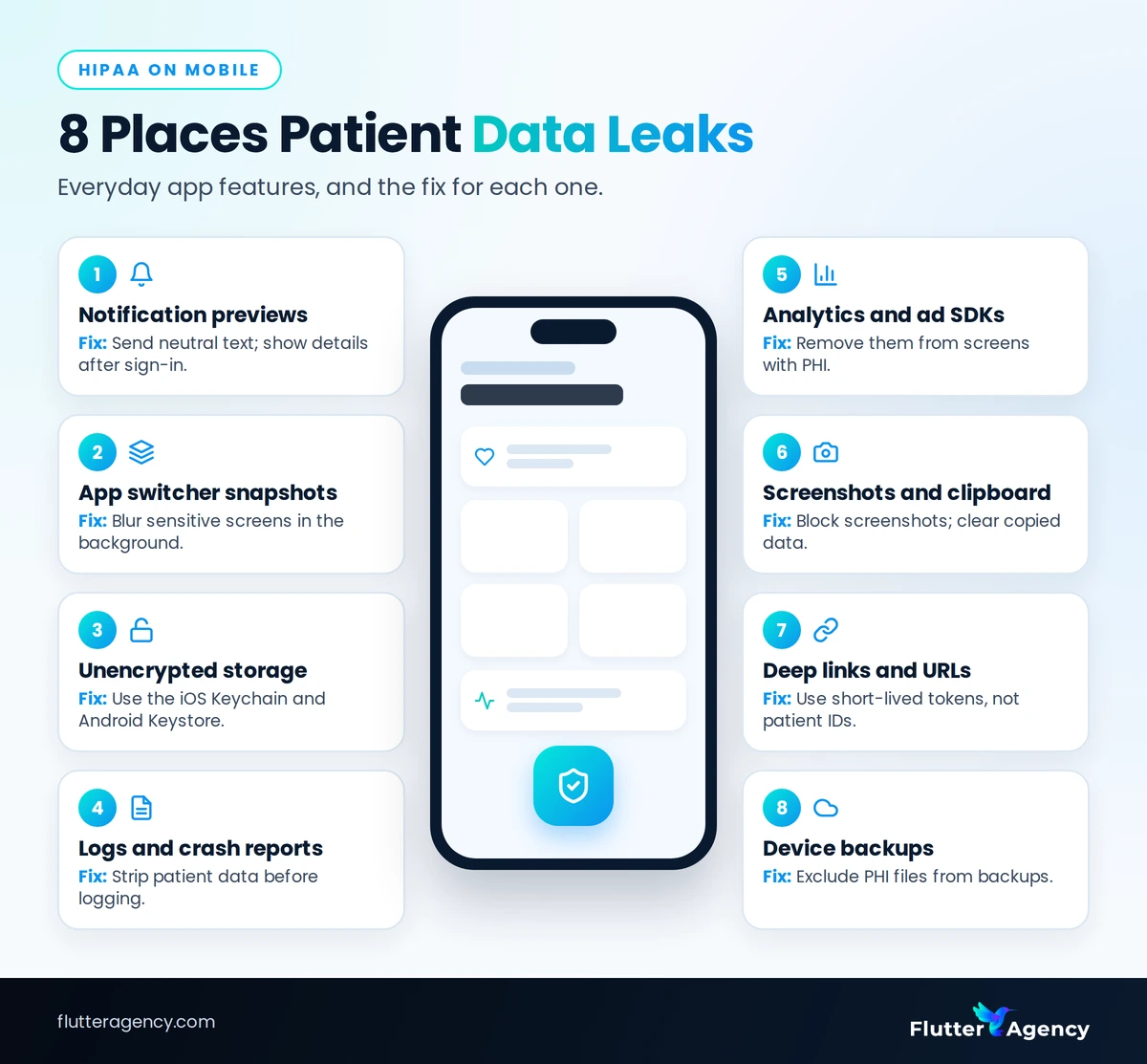
These are the eight leak points we check in every medical app development project:
- Push notification previews: “Your HIV test result is ready” shows on a locked screen. Fix: send neutral text and show details only after sign-in.
- App switcher snapshots: the phone saves a picture of the last screen. Fix: blur sensitive screens when the app goes to the background.
- Unencrypted local storage: tokens and cached records sit in plain files. Fix: use the iOS Keychain and Android Keystore.
- Logs and crash reports: a patient name ends up in a third-party crash tool. Fix: strip PHI before anything is logged.
- Analytics and ad SDKs: events like “viewed_diabetes_plan” reach ad platforms. Fix: remove SDKs from PHI screens or use vendors that sign a BAA.
- Screenshots and the clipboard: records get copied off the screen. Fix: block screenshots on sensitive screens and clear copied data.
- Deep links and URLs: a link like /patient/48213/results exposes an ID. Fix: use short-lived, opaque tokens.
- Device backups: cloud backups copy local files off the phone. Fix: exclude PHI files from backups.
Point 5 is not theoretical. In 2025, tracking tools on Blue Shield of California’s website may have disclosed data on 4.7 million people to platforms such as Google and Meta (HIPAA Journal).
For UME, we paired a Flutter app with a Java Spring Boot backend on AWS and MySQL. The rule we now apply to every health project: map where patient data lives before the first screen is designed.
A HIPAA-compliant app closes all eight gaps before the first release, when each fix is still cheap.
Must-Have Features: Patient App vs Provider App
Every health app needs secure sign-in, consent, audit logs and encrypted data. Beyond that, patient apps focus on access and reminders, while provider apps focus on records and daily workflow.
Features to build in the MVP
- Secure sign-in with MFA: the first control hospital clients and auditors ask about.
- Consent and privacy settings: patients choose who sees their data, such as their doctor but not a family member.
- Audit logs: a record of who viewed or changed each record, reviewed by admins.
- Appointment booking: patients book and reschedule, providers manage availability, and reminders reduce no-shows.
- Secure messaging: patients message the care team without anyone using personal phones or email.
Features to add later
- Medication reminders: build first only if you are making a medication app.
- EHR access: patients view their own records and providers see the full chart.
- Wearable and device data: start with one or two readings, such as blood pressure or steps.
Device data and EHR access
Device data comes from HealthKit on iPhone and Health Connect on Android. Both ask permission per data type, so request only what the feature needs.
Record access usually runs through SMART on FHIR, an HL7 standard that lets an app sign in to an EHR and read data with the patient’s consent (HL7).
In healthcare mobile app development, the best MVP is usually the five MVP features above. Add EHR access and devices once real users ask for them.
AI Healthcare App Development: What Is Safe to Build in 2027
AI that assists staff and patients is the safe place to start. AI that diagnoses a condition or recommends a treatment can turn the app into a regulated medical device, with FDA review.
Safe AI features to start with
The smart starting point for AI healthcare app development is the paperwork and waiting around care, not the care itself:
- Visit note drafts: AI drafts the note and a clinician reviews and signs it.
- Intake and triage questions: AI collects symptoms, then hands the patient to a human.
- Booking and refill assistants: routine questions get answered at any hour, so fewer calls reach the front desk.
- Document reading: AI reads insurance cards or referral letters and fills forms for staff to check.
Our developers use AI assistants such as Gemini and Copilot to move faster in Flutter. On health projects, we keep real patient records out of those tools and test with synthetic data instead.
3 rules for using AI with patient data
- Sign a BAA with every AI vendor that sees PHI. If a vendor will not sign, strip all patient identifiers first.
- Keep a human in the loop: a qualified person reviews any clinical output before it reaches a patient or a record.
- Log every AI action, input and output, so you can audit exactly what happened later.
If you want help scoping AI features, see our AI app development services.
Also read: AI App Ideas: 10 Profitable Ideas in 2026
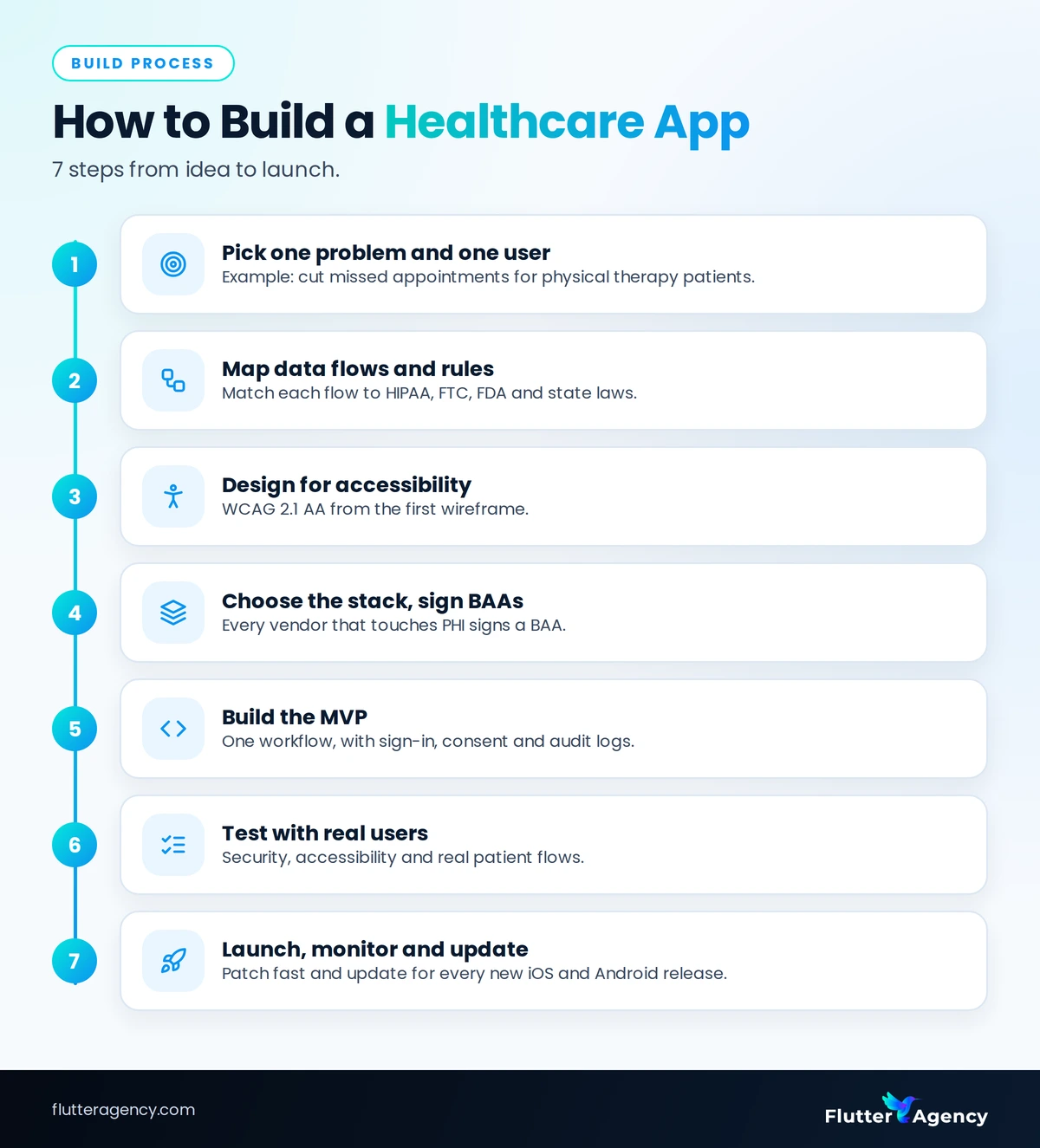
How to Build a Healthcare App in 7 Steps
The safest path is one problem, one user role, compliance mapped before design, and testing for security and accessibility before launch. Each step removes a common cause of rework in healthcare app development.
Step 1: Pick one problem and one user
Choose one clinical or admin problem and one primary user, such as “cut missed appointments for our physical therapy patients.”
Step 2: Map data flows and rules
List every place patient data is created, stored or sent. Then match each flow to the rules that apply: HIPAA, the FTC rule, FDA device rules and state privacy laws.
Step 3: Design for accessibility
Design to WCAG 2.1 AA from the first wireframe, with readable text sizes, strong contrast and screen-reader labels.
Step 4: Choose the stack and sign BAAs
Pick the tech stack and hosting, then sign a BAA with every vendor that will touch PHI. Check each vendor’s covered services, since a BAA rarely covers every product.
Step 5: Build the MVP
Build around the one workflow from step 1, with sign-in, consent and audit logs in place from day one.
Step 6: Test with real users
Test security, accessibility and real-user flows with actual patients and staff, not only your own team.
Step 7: Launch, monitor and update
Launch, watch for errors and patch quickly. Update the app for each new iOS and Android release.
Our standard process runs from planning and design to development, QA, deployment and post-launch support. For health apps, we add a data-flow and compliance review before any design work starts.
The 2027 accessibility deadline
Under Section 504, HHS requires that accessibility standard for the web content and mobile apps of providers that receive HHS funding, including apps vendors build for them.
The compliance dates are May 11, 2027 for organizations with 15 or more employees and May 10, 2028 for smaller ones (Federal Register).
If your client receives HHS funding, such as Medicaid payments, assume the rule applies and confirm with counsel. In health app development, building accessibility in from step 3 costs far less than a redesign after launch.
Healthcare App Development Cost in 2027 by App Type
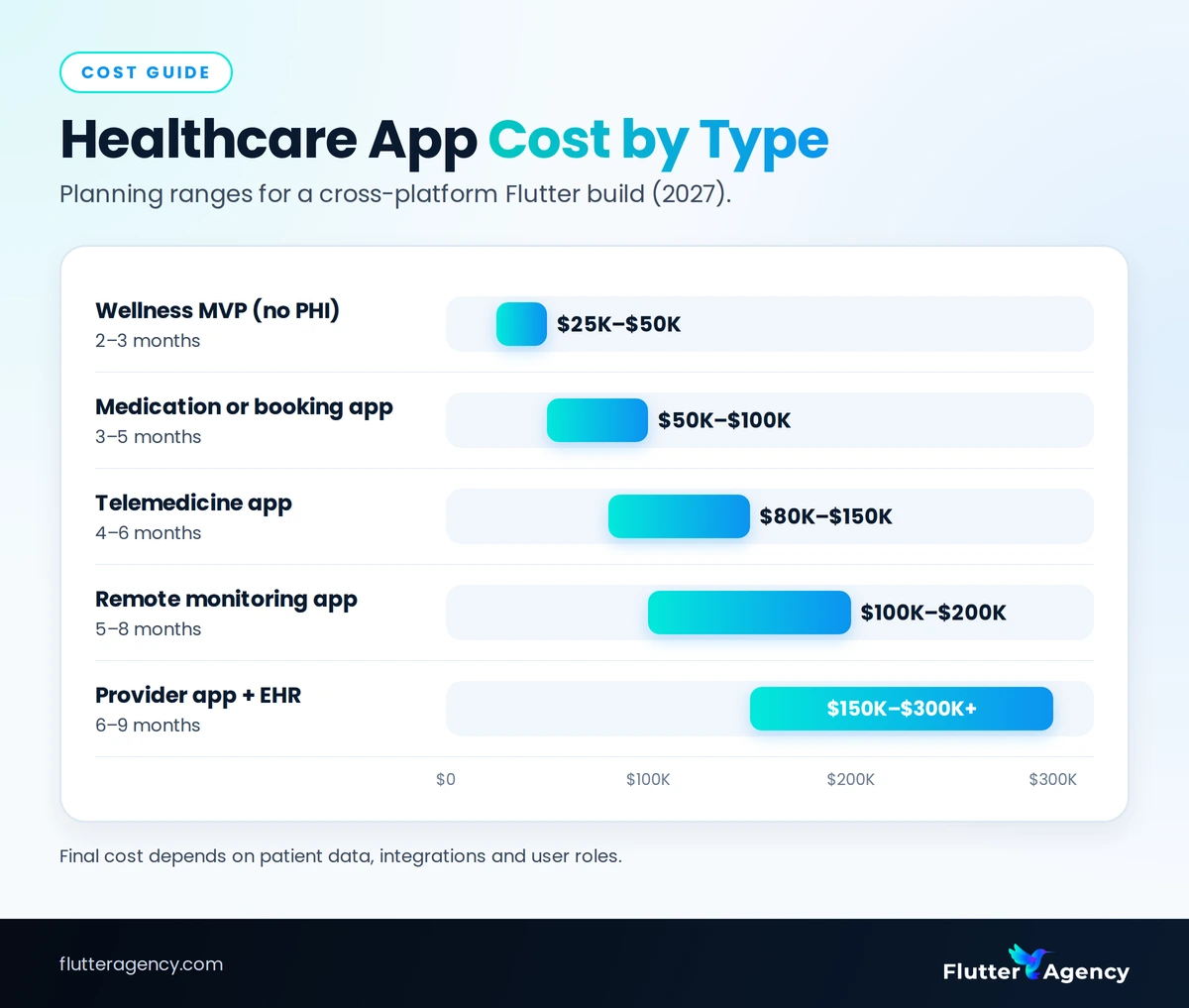
Healthcare app development cost depends less on screen count and more on three things: whether the app stores patient data, how many systems it connects to, and how many user roles it serves.
Cost and timeline by app type
These planning ranges assume a cross-platform Flutter build with a US-ready compliance setup. Use them to size a budget, not as a quote.
- Wellness or tracking MVP (no PHI): 2–3 months, $25,000–$50,000.
- Medication or appointment app with PHI: 3–5 months, $50,000–$100,000.
- Telemedicine app: 4–6 months, $80,000–$150,000.
- Remote monitoring app: 5–8 months, $100,000–$200,000.
- Provider app with EHR integration: 6–9 months, $150,000–$300,000 or more.
When founders bring us a health app idea, we usually cut the first release to one user role and one core workflow. That keeps the MVP budget tight and puts the app in front of real users sooner.
How much does it cost to build a healthcare app?
A focused healthcare app MVP that stores patient data usually costs $50,000–$100,000 and takes 3–5 months. Telemedicine, device monitoring and EHR integration each push the budget higher.
Hidden and ongoing costs
- Maintenance: often 15–25% of the build cost per year.
- BAA-eligible hosting and vendors: some only sign a BAA on business or enterprise plans.
- Security testing: penetration tests and a yearly risk assessment, which hospital buyers often ask to see.
- Accessibility audits: check key screens each year and after major releases.
- OS and app store updates: each new iOS and Android version needs testing.
How Flutter lowers the budget
In healthcare application development, Flutter builds the iOS app, the Android app and the web portal from one codebase. That means one team, one test suite and one release process.
The saving depends on how much native device work the app needs. Before you start, use our Flutter MVP launch checklist to keep the first release small.
Also read: Flutter Developer Cost and Hourly Rates in 2026
Want a budget for your own app? Share your idea with our team and get a cost and timeline estimate based on your features.”
Flutter vs Native vs No-Code for Healthcare Mobile App Development
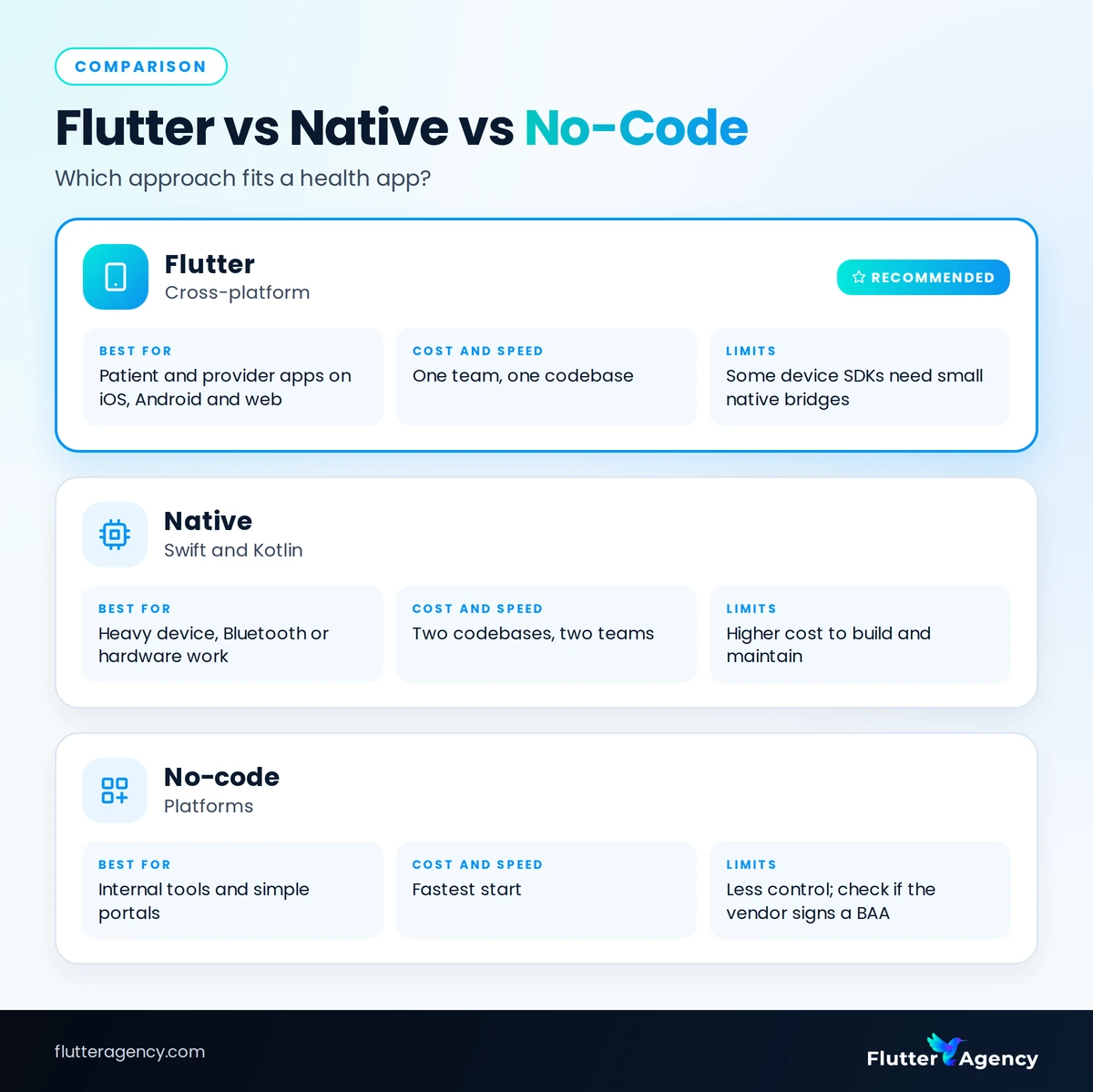
Flutter fits most patient and provider apps, native development fits heavy device or hardware work, and no-code fits simple internal tools. The right choice depends on who uses the app and what it connects to.
Flutter (cross-platform)
Best for patient and provider apps on iOS, Android and web. One team and one codebase keep cost and time down, though some device SDKs need small native bridges.
Native (Swift and Kotlin)
Best for heavy device, Bluetooth or hardware work. It needs two codebases and two teams, so it costs more to build and maintain.
No-code platforms
Best for internal tools and simple portals, with the fastest start. You get less control over data flows, so check whether the vendor signs a BAA.
Which approach to choose
In mobile app development for healthcare, the cost and speed gap usually matters more than these limits, which affect only one or two features.
Our verdict for healthcare mobile app development: start with Flutter unless the app depends on custom hardware, and add native modules only where a device SDK requires them.
What Flutter 3.47 changes
Flutter 3.47, released in August 2026, raised the minimum iOS version from 13 to 15 to support Xcode 27 (Flutter blog). Check your patients’ devices before you upgrade.
The same release made Material and Cupertino available as standalone packages, with the copies inside the core SDK scheduled for deprecation. Plan both changes into your release calendar.
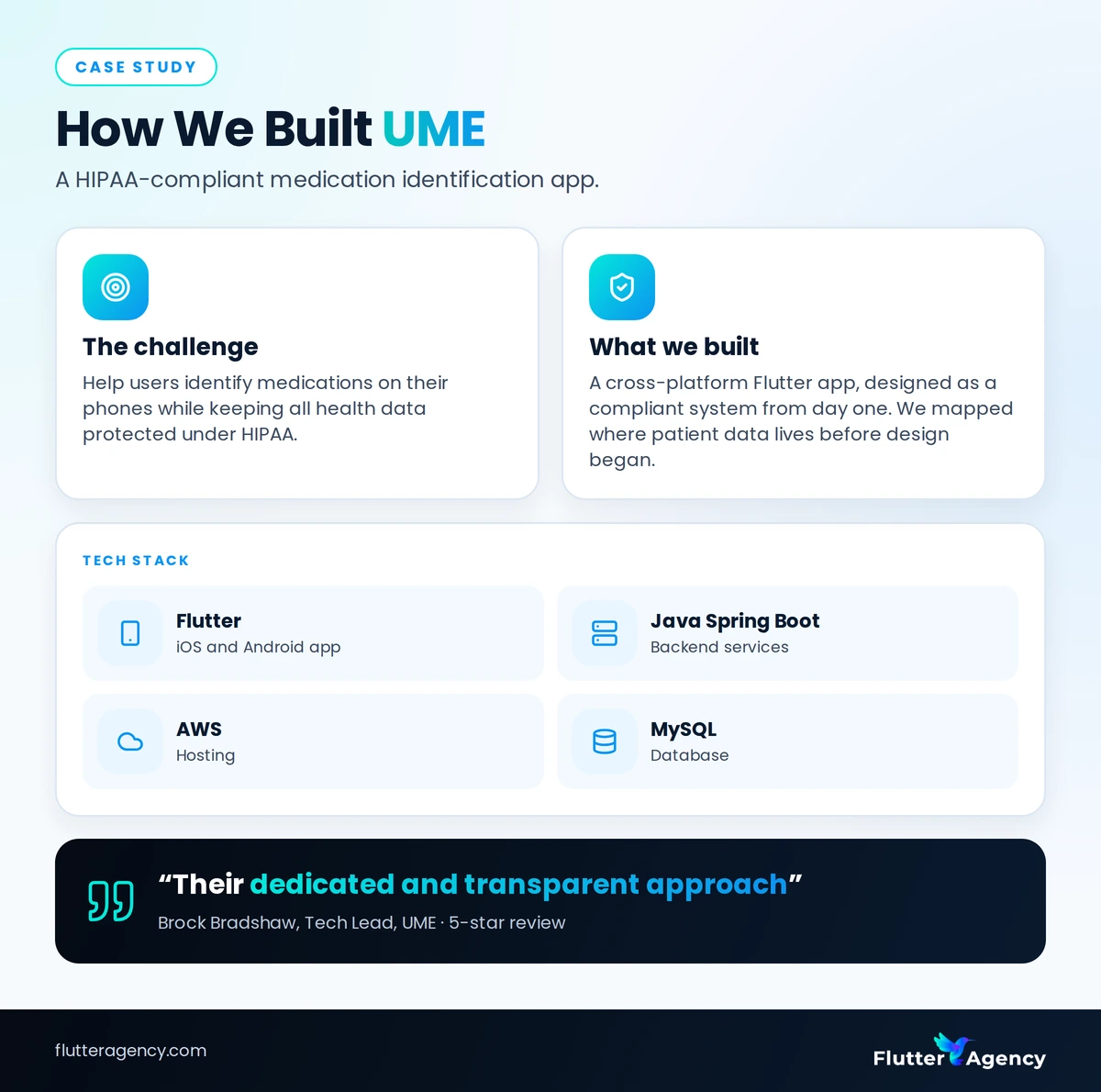
Case Study: How We Built UME, a HIPAA-Compliant Medication App
UME is a medication identification app that Flutter Agency designed and built for a healthcare client. It shows how the rules in this guide work on a real project.
The challenge
The client needed a simple way for users to identify medications on their phones, while keeping all health data protected under HIPAA. [add the client’s goal in one sentence]
What we built
We built a cross-platform Flutter app for simplified medication identification, designed as a compliant system from the start rather than secured after launch.
Before design began, we mapped where patient data would be created, stored and sent, then built the app and backend around that map.
Tech stack
- Flutter for the iOS and Android app, from one codebase.
- Java Spring Boot for the backend services.
- AWS for hosting.
- MySQL for the database.
The result
UME’s tech lead, Brock Bradshaw, gave the project a five-star review and praised our “dedicated and transparent approach.” Read the full UME project page.
How to Choose a Healthcare App Development Company
Pick a healthcare app development company that will sign a BAA, can show a shipped health app, and explains how it keeps real patient data out of test builds and AI tools.
6 questions to ask before you hire
- Will you sign a BAA? The answer should be yes, and their hosting and tool vendors should sign one too.
- Which health apps have you shipped? Ask for live examples and a call with at least one client.
- Where does test data come from? Good teams use synthetic data and never copy real patient records.
- How do you test accessibility? Look for a named standard and screen-reader testing, not just a visual check.
- Who owns the code and accounts? You should own the code, cloud accounts and store listings, in writing.
- What does post-launch support include? Ask how fast they ship fixes and OS updates, and what it costs.
Experienced healthcare app developers give clear, specific answers to all six. Vague answers on BAAs or test data are a reason to keep looking.
If you want a Flutter team that has built a HIPAA-compliant medication app, you can hire Flutter developers from Flutter Agency.
Also read: How to Choose the AI App Development Company
6 Common Mistakes in Health App Projects (and How to Avoid Them)
Most delays, budget overruns and compliance problems in health app projects trace back to six avoidable mistakes. Each one is cheaper to prevent than to fix.
- Building for every user at once: patient, provider and admin apps in one release mean a long build and no early feedback. Start with one role.
- Adding analytics before mapping data: a standard analytics SDK on a results screen can send health data to a third party.
- Assuming the cloud host covers everything: a BAA covers only listed services, yet teams still send PHI into logs, crash tools or email.
- Leaving accessibility for later: retrofitting screen-reader labels and contrast means redesigning screens, and the Section 504 deadlines add legal risk.
- Using real patient data in testing: copied records spread PHI to laptops, test phones and outside tools. Use synthetic data.
- Treating launch as the finish line: health apps need patches, OS updates and yearly security reviews, or they become outdated and risky within a year.
Frequently asked questions
How long does healthcare app development take?
A focused MVP usually takes 3 to 5 months, and a full product with integrations takes 6 to 9 months or more. Compliance review, EHR connections and app store review are what most often add time.
Is Flutter good for healthcare apps?
Yes, Flutter suits most patient and provider apps because one codebase covers iOS, Android and web. HIPAA compliance depends on your backend, hosting and processes, not on the UI framework you pick.
Can a healthcare app use Firebase and stay HIPAA compliant?
Only in part. You must sign Google Cloud’s BAA and keep PHI in covered products such as Firestore and Cloud Storage. Services like Crashlytics and Google Analytics for Firebase are not covered, so keep PHI out of them.
Do I need FDA clearance for a health app?
Only if the app works as a medical device, for example by diagnosing a condition or driving treatment decisions. The FDA uses enforcement discretion for many low-risk apps, so get regulatory advice early.
What is the cheapest way to launch a healthcare app MVP?
Serve one user role and one workflow, avoid storing PHI in the first version if you can, and build cross-platform. Add EHR links, devices and extra roles once real users prove they need them.
Do Apple and Google review health apps differently?
Yes. Google Play requires every app to complete a Health apps declaration, and Apple’s App Review Guidelines add rules for health data and medical claims. Expect extra review questions for medical features.
How much does it cost to maintain a healthcare app each year?
Plan for roughly 15 to 25 percent of the build cost each year. That covers OS updates, security patches, hosting, vendor fees and compliance reviews, which health apps need more often than most apps.
Next Steps: Plan Your Healthcare App Before You Build It
Start with one problem and one user, then decide whether HIPAA, the FTC rule or FDA rules apply. Those two choices shape every later decision about features, vendors and hosting.
Next, plan for accessibility and the eight mobile leak points from the first wireframe. Fixing them in design costs far less than fixing them after launch or after a breach.
Finally, price the first release honestly. Healthcare app development cost stays under control when the MVP is small, the stack is shared and maintenance is budgeted from year one.
If you are planning a patient, provider or admin app, talk to our team about your idea, and we will help you scope the first release.




Read and share new topics about all things Tech.
Fill out the form below and we will be in touch soon!
"*" indicates required fields